Lock Screen – Time Password App: Dynamic Security with Smart Privacy Features
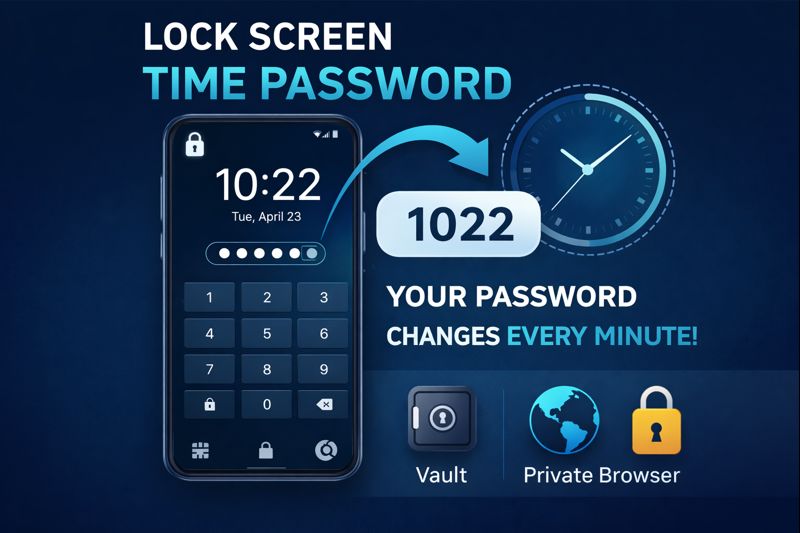
Smartphone security is no longer limited to simple PINs or pattern locks. With evolving privacy concerns, users now look for smarter and more unpredictable protection methods. Lock Screen – Time Password is an innovative Android app that transforms your phone’s current time into a constantly changing password, offering a dynamic and highly secure lock screen experience.
Instead of relying on a fixed PIN that can be memorized or observed, this app ensures your password updates automatically every minute, making unauthorized access extremely difficult.
What Is Lock Screen – Time Password?
Lock Screen – Time Password is an Android security application that uses your device’s real-time clock as your lock screen password. For example, if the time is 08:27, your unlock code becomes 0827. One minute later, the code changes again.
This ever-changing PIN system significantly reduces the chances of password guessing, shoulder surfing, or repeated failed attempts.
Beyond basic locking, the app also works as a privacy tool by offering features like a media vault and private browser.
How Does Time-Based Lock Security Work?
The app synchronizes your lock password with your phone’s system time. Since time never stays constant, neither does your password.
You can also combine time with a personal PIN for added safety. This ensures that even if someone knows the current time, they still can’t unlock your phone without your custom code.
This approach provides an extra layer of security compared to traditional static lock screens.
Why Is This App Useful?
Lock Screen – Time Password is especially useful for users who:
- Use their phone frequently in public places
- Want protection against people watching their PIN
- Prefer an automatic and smart security system
- Need additional privacy tools in one app
Because the password keeps changing, it becomes almost impossible for others to remember or reuse it.
Key Features of Lock Screen – Time Password
1. Dynamic Time-Based Password
Your lock screen PIN refreshes every minute using real-time clock data.
2. Multiple Lock Combinations
Choose from several security formats, including:
- Current Time Only
- PIN + Current Time
- PIN + Minute
- PIN + Hour
- PIN + Day
3. Private Vault
Hide your personal photos and videos in a secure vault that remains inaccessible from the gallery.
4. Private Browser
Browse the internet without saving history, cookies, or cache for extra privacy.
5. Stylish Lock Screen Design
Enjoy a modern interface with iPhone-style lock screen effects and smooth animations.
6. Full Customization Options
- HD wallpapers or custom images
- Custom lock screen text or name
- Unlock sound and vibration control
- 12-hour or 24-hour time format
7. Lightweight & Battery Friendly
Designed to run smoothly without draining battery or slowing your device.

How to Use Lock Screen – Time Password App
Getting started is simple:
- Download the app from Google Play Store
- Open the app and grant necessary permissions
- Select your preferred lock type
- Customize lock screen appearance
- Enable vault to secure private media
- Use private browser for secure browsing
For Xiaomi or MIUI devices, enabling Auto Start is recommended for stable performance.
Permissions Explained
The app may request permissions such as:
- Internet access (for ads)
- System alert window (to display lock screen)
- Storage access (for wallpapers & vault files)
- Camera (for custom images)
- Phone state & call access (to relock after calls)
These permissions help the app function correctly. According to the app description, no personal data is collected or shared.
Tips for Xiaomi / MIUI Users
To avoid lock screen issues on Xiaomi phones:
- Open Security App
- Go to Permissions
- Allow all permissions for the app
- Enable Auto Start
This ensures smooth functioning even after reboot.
Pros and Cons
Pros
- Unique and dynamic security concept
- Time-based password updates automatically
- Built-in vault for private content
- Private browser included
- Highly customizable interface
- Lightweight and user-friendly
Cons
- Ads in free version
- Requires multiple permissions
- Initial setup may confuse some users
Important Warning
⚠️ Do not uninstall the app without restoring hidden files.
Media stored in the vault may be permanently lost if the app is removed without recovery.
Our Verdict
Lock Screen – Time Password is an excellent choice for users who want a smarter alternative to traditional lock screens. Its time-based PIN system adds unpredictability and security, while extra tools like the vault and private browser enhance overall privacy.
If set up properly, especially on MI devices, this app delivers a perfect balance of security, privacy, and style.
Frequently Asked Questions
Q1. Can I reset the app if I forget settings?
Yes. Clear app storage from system settings to restore defaults.
Q2. Can I use my own image as wallpaper?
Yes. The app allows selecting custom images from the gallery.
Q3. Is the app safe to use?
Yes, when downloaded from the official Play Store and configured correctly.
Final Words
If you’re looking for a modern, dynamic, and privacy-focused lock screen solution, Lock Screen – Time Password is definitely worth trying. Its continuously changing password system makes your phone harder to unlock without permission, while added privacy tools give you peace of mind.